meles, part 2: the file that was deleted, and what green means
Ask a vulnerability scanner about an image and it answers one question:
which packages have known weaknesses? That is a good question, and every
pipeline should ask it. But it is not the question of what else is in the
image. A file that matches no package has no CVE, and a file that was deleted
in a later layer is not even part of the filesystem most tools look at.
Part 1 explained what meles is and how its parts fit together. This part
is shorter and more practical. First a demo you can run in five minutes: a
file that is gone from the container, still in the image, and found anyway.
Then the question that kept coming back while building meles: when has a
scanner earned the right to say “clean”?
A file that is not there
The demo uses EICAR, a harmless 68-byte test string that every virus
scanner reports on purpose. This Dockerfile writes it to a file and deletes
it again in the next step:
FROM busybox:1.37
# The EICAR test string, in two parts so that this Dockerfile itself
# does not trigger a virus scanner.
RUN printf '%s%s' 'X5O!P%@AP[4\PZX54(P^)7CC)7}$EICAR-STANDARD-' 'ANTIVIRUS-TEST-FILE!$H+H*' > /tmp/eicar.com
RUN rm /tmp/eicar.com
Build it and look inside. /tmp is empty:
$ docker build -t meles-demo .
$ docker run --rm meles-demo ls -la /tmp
total 8
drwxrwxrwt    1 root     root          4096 Nov  5 19:26 .
drwxr-xr-x    1 root     root          4096 Nov  5 19:26 ..
Now ask meles. The image was built but not pushed, so meles reads it from a
docker save archive:
$ docker save meles-demo -o meles-demo.tar
$ meles image --input meles-demo.tar

docker.io/library/meles-demo:latest (191cbd1ecd2d) from meles-demo.tar
engine: ClamAV 1.4.6, signatures 28164, scanned in 499ms

PLATFORM     LAYERS  FILES  FINDINGS  SKIPPED
linux/amd64  3       17     1         0

Findings (1):
PLATFORM     LAYER             PATH            SIGNATURE
linux/amd64  2 (a7bf4ca7325d)  /tmp/eicar.com  Eicar-Test-Signature

STATUS                         CREATED BY
deleted in layer 3 (whiteout)  RUN /bin/sh -c printf ...
$ echo $?
1
The finding is one line in the terminal, wrapped here to fit the page. It says
what you need to know: which file, which signature, which layer
added it, which instruction created that layer, and that layer 3 hid it. The
exit code is 1, so a pipeline stops here without any extra flag.
You do not have to take the scanner’s word for it. Unpack the archive and
list the two layers:
$ mkdir x && tar -xf meles-demo.tar -C x
$ tar -tvf x/blobs/sha256/a7bf4ca7325d...
drwxrwxrwt 0/0               0 2026-11-05 20:26 tmp/
-rw-r--r-- 0/0              68 2026-11-05 20:26 tmp/eicar.com
$ tar -tvf x/blobs/sha256/feccae0f6376...
drwxrwxrwt 0/0               0 2026-11-05 20:26 tmp/
-rw------- 0/0               0 2026-11-05 20:26 tmp/.wh.eicar.com
The 68 bytes are still there, in layer 2. rm did not remove them. It added
an empty file called .wh.eicar.com to layer 3, and that whiteout tells
the container runtime not to show the file. Everyone who pulls the image gets
it.
Why this matters outside a demo
A deleted file does not run on its own, and a deleted finding is not an
active infection. It is still worth a look, for three reasons:
- It ships. The registry distributes the file to everyone who pulls the
image, and anyone can read it from the layer. A later build that uses this
image as its base carries it along, too. - It says something about the build. Something put that file there. It may
be left over from a harmless build step, or a sign that a step did more
than you thought. The layer and the instruction tell you where to look. - A clean-up looks like a solution. The file is gone from the container, so
every check inside the running container is happy.
The same goes for everything else people delete in a later layer, such as
credentials or build tools. If you want a file out of an image, it must never
reach a layer: use a multi-stage build, or create and delete it within the
same RUN. Then meles has nothing to report either, because the image really
does not contain it.
What “clean” has to mean
The whiteout is the visible trick. The less visible work in meles went into
something else: a scanner that wrongly says “clean” is worse than no scanner,
because you stop looking. So there is a simple rule: what could not be
checked is never clean. A file above a size limit makes the report
Incomplete, and a scan that failed is an Error. Neither counts as clean.
Every limit could otherwise be dodged by making a file bigger.
The rule sounds easy. Then you try to keep it, and find out how many ways
there are to be green without having checked anything. Three examples from
the last few days.
The check that passed by accident
Since v0.3.0 every release scans its own image before publishing it, with
meles for malware and with Trivy for vulnerabilities. The workflow also
compares digests, so that the image that gets published is the one that was
scanned.
The first dry run was green, with the full signature database. Then I read
the clamd log and found this line:
AlertExceedsMax heuristic detection disabledMy small clamd configuration for CI lacked one option that the Helm chart
sets. Without AlertExceedsMax, clamd answers OK for a file it gave up on
because it exceeded a limit. In that dry run nothing was missed. But a file
above clamd’s limits in a future release would have passed the self-scan as
clean, and the job would have stayed green. The chart protected the users of
meles from this, but not the one place where meles checks itself.
It is one line in a config file. I only found it because the script happens
to print the log at the end.
clamd answers, and finds nothing
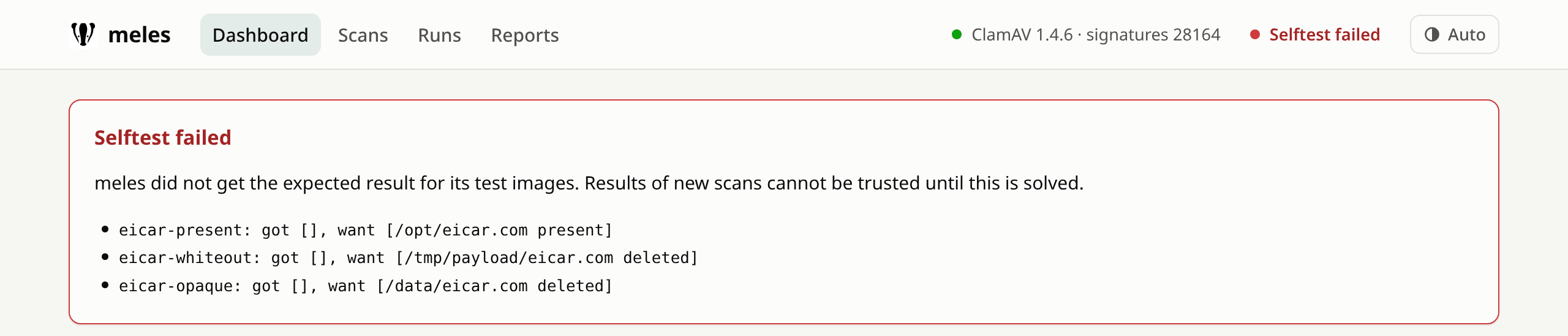
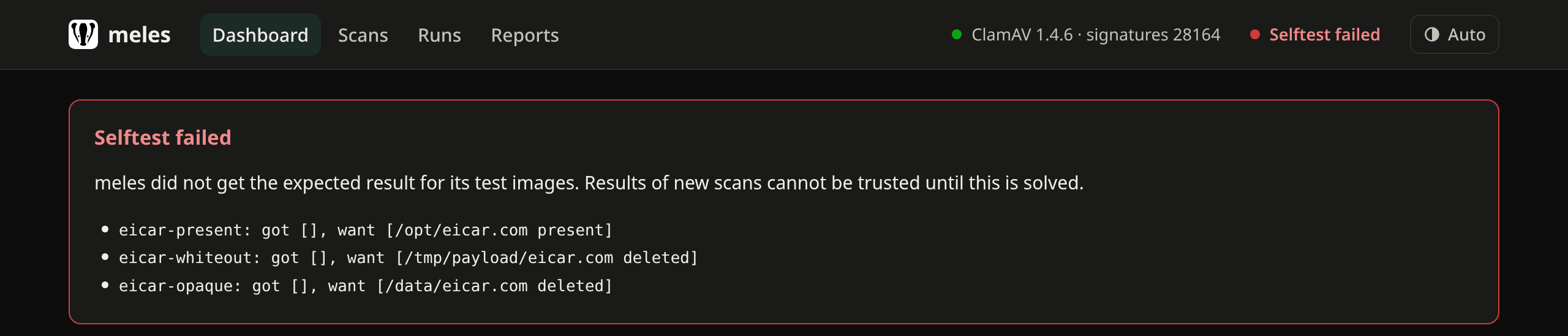
The web UI has a green dot for clamd. It means that clamd answers. It does not
mean that clamd finds anything. meles selftest checks exactly that: it builds
images with EICAR files at runtime, serves them from an in-memory registry and
compares what it finds with what it must find, including the deleted files
from the demo above. But the selftest was a CronJob, suspended by default, and
its result only lived in the log of a job.
So since v0.3.1 the server runs the selftest itself, every six hours, and
shows the result next to clamd. To test it, I replaced the EICAR signature in
a running setup and restarted clamd:
| State | clamd dot | Selftest |
|---|---|---|
| Normal | green | passed |
| Signature removed | green | failed, 3 test images |
| Signature restored | green | passed after about 30 seconds |
The second row is the point: everything that only asks “are you there?”
stays green.
The selftest that would have tested nothing
Building that had its own trap. The server keeps a cache of results per layer
digest and signature version, so that base images are not scanned again. The
test images are the same on every run. Using the server’s scanner as it is,
the first selftest would have asked clamd, and all later ones would have
answered from the cache until the next signature update. A check that has
stopped checking, and stays green while doing so.
I noticed that before it was written, and the selftest now runs without the
cache. A test proves it: two runs must reach the engine twice. If I remove
that one line, the test fails.
Honest limits
None of this makes an image safe. The demo finds EICAR because every engine
knows EICAR. “Clean” from meles means that no signature or rule known at that
time matched, in every file of that digest:
- Malware without a signature is not found. That is why the operator scans
again after signature updates. - Encrypted archives cannot be inspected.
- What a container downloads after it starts is out of reach. That is a job
for runtime detection. - A
deletedfinding needs a person to look at it. False positives exist,
and ignore rules need a reason and an expiry date for that reason.
Reading the results covers all of this, including what each result does in
a pipeline and in the scan gate.
Try it
Everything above runs on a laptop with Docker. The
getting started guide has the demo step by step, and the
TL;DR gets you a running clamd and a first scan with six lines.
If you try it on your own images, I would like to hear what you find,
especially false positives: issues are welcome.
Next in this series
- A full demo in a cluster: from a finding in CI to reports, the scan gate
and ignore rules. - A deep dive into layer scanning, whiteouts and the digest cache.
- Later: the operator across a fleet of clusters.