A Local LLM Experiment That Grew Into a Kubernetes App
feed-reader-llm is a self-hosted RSS aggregator that summarises articles in any language via a local LLM and serves them as a cyberpunk-styled web page on Kubernetes.
It started with a hardware purchase and a question. I wanted to experiment with local LLMs, so I got an RTX 5060 Ti with 16 GB VRAM and set up llama.cpp as a local OpenAI-compatible API endpoint. What I needed next was something concrete to drive the experiments. News summarisation was a natural first target: short inputs, measurable output quality, immediately useful. So I wrote a small Python script, pointed it at the local API, and had it dump summaries into a static HTML file.
That was the beginning. One question led to the next, the script grew features, and eventually it ended up in the Kubernetes cluster. The feed reader is what the experiment became — not what it was meant to be. If that sounds like your kind of weekend project, read on.
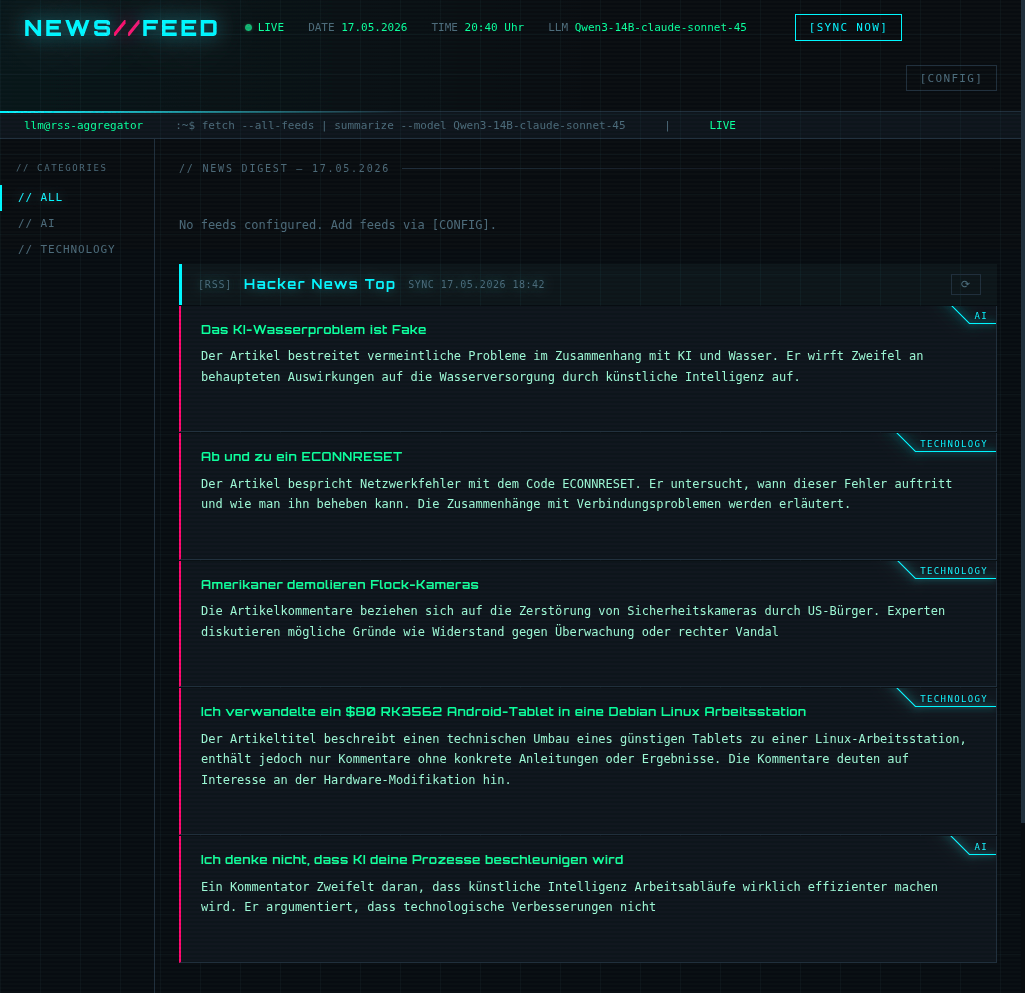
Abbildung 1: FeedReader-LLM
Where it started
The original version was a single Python file. It fetched a hardcoded list of RSS feeds, sent each article title and description to a local llama.cpp instance, and wrote the summaries into an HTML file that nginx served statically.
That’s it. Around 80 lines. No database, no config, no API.
But once it worked, the questions started coming:
- What if the feed list was configurable without touching the code?
- What if articles weren’t re-summarised every time?
- What if I could trigger a sync from the browser?
- What if each feed loaded independently instead of waiting for the whole batch?
Each “what if” became a session with Claude. The script grew. Then it grew some more. Fourteen minor versions later it looks nothing like the original — but you can still read the git history and see exactly how each feature was added.
What the LLM actually does
The interesting part, and the reason I kept going, is how naturally a local LLM slots into a pipeline like this.
Every new article gets sent to the LLM in a single API call. The model is asked to respond in a strict three-line format:
CATEGORY: Technology
TITLE: Translated article title in the configured language
SUMMARY: 2-3 sentence summary in the configured language.
One call per article, three things back: a free-form category word, a translated title, and a summary. Everything gets stored in PostgreSQL, so the browser gets pre-digested content on the next page load — no waiting for the LLM at read time.
The LLM only ever sees genuinely new articles — already-stored summaries are reused on subsequent syncs. Categories are free-form: the model picks whatever English word fits, no predefined vocabulary needed. The summary language is configurable at runtime, and any OpenAI-compatible endpoint works — Ollama, llama.cpp, LM Studio, or a hosted API.
How the architecture evolved
The rendering approach went through the biggest change across versions.
Early on, the generator wrote a single index.html and nginx served it. Simple, but it
meant waiting for all feeds to finish before the page showed anything.
Version 1.4 changed that completely. The generator now writes a lightweight shell page with
one HTMX loading slot per enabled feed. As each feed finishes, the generator drops its block
file into /html/blocks/<id>.html. The browser polls every few seconds and fills each slot
as soon as its block appears. Fast feeds show up immediately; slow ones don’t hold back the rest.
The pod runs three containers sharing a single volume: nginx serves the shell and block files, the generator runs in a loop fetching feeds and calling the LLM, and a small Flask API server handles the config panel and sync triggers. Sync coordination happens through a flag file on the shared volume — no message bus needed.
The actual point
The feed reader is not the point. The point is to experiment with a local llm and see that a smal Python script can become a reasonably complete Kubernetes application across a handful of evenings with a capable model.
The code is on GitHub. Fork it, run it, break it, extend it. That is what it is there for.